Understanding the Internet of Things (IoT): Smart Devices in Our Daily Lives

Understanding the Internet of Things (IoT): Smart Devices in Our Daily Lives

The Internet of Things (IoT) refers to everyday objects that are connected to the internet and can send or receive data. These devices are called “smart” devices because they can work automatically, communicate with each other, and make our lives easier.

In simple terms, IoT allows ordinary devices to connect, share information, and respond without human intervention.

What Are Smart Home Devices?

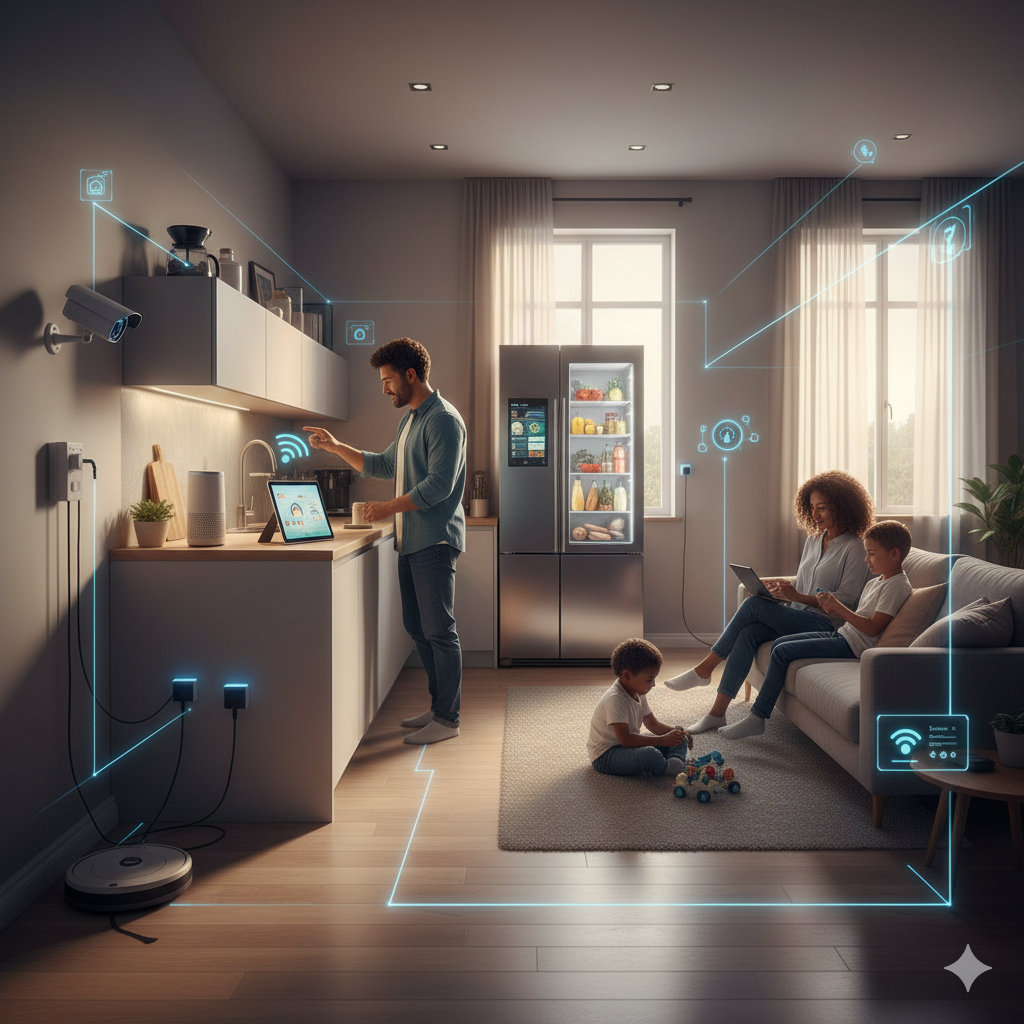
Smart home devices are one of the most common examples of IoT. These devices are used in our homes and can be controlled through smartphones or voice assistants.

Examples include:

Smart lights that turn on or off using an app or voice command

Smart thermostats that adjust room temperature automatically

Smart security cameras and door locks that improve home safety

These devices help save time, increase comfort, and improve energy efficiency.

What Are Wearable Devices?

Wearables are smart devices that people wear on their bodies. They are designed to monitor health, fitness, and daily activities.

Common wearable devices include:

Smartwatches that track steps, heart rate, and sleep

Fitness bands that monitor exercise and calories burned

Wearables collect data and give users helpful insights about their health and lifestyle.

What Are Connected Devices?

Connected devices include any objects that can connect to the internet and communicate with other systems.

Examples include:

Smart refrigerators that track food items

Connected cars that provide navigation and safety features

Smart TVs and speakers that stream content and respond to voice commands

These devices work together to create a more efficient and connected environment.

Why Is IoT Important?

IoT makes everyday life:

More convenient – tasks can be automated

More efficient – energy and time are saved

More informed – users receive real-time data

IoT is not only used in homes but also in healthcare, transportation, agriculture, and cities.

Challenges of IoT

Despite its benefits, IoT also has challenges:

Privacy and data security risks

Dependence on internet connectivity

Compatibility between different devices

These challenges highlight the importance of strong security and responsible use.

Conclusion

The Internet of Things is changing the way we live and interact with technology. From smart homes and wearables to connected devices, IoT is becoming part of everyday life. As technology continues to grow, IoT will play an even bigger role in creating smarter and more connected communities.

10 Perspectives on the 2026 Tech Takeoff

We often talk about technology in terms of ‘specs’—gigawatts, base pairs, and parameters. But in 2026, the story has changed. We aren’t just building better tools; we are rewriting the fundamental scripts of how we live, how we think, and what it means to be human

1. The “Data Colony” Conflict
Hyperscale AI Data Centers The Angle: While the world focuses on the output of AI, a new geopolitical friction is emerging over its physical footprint.

Unique Idea: Explore the “Resource Sovereignty” movement, where local communities are beginning to protest data centers that consume up to 500,000 gallons of water daily. The article could profile “Data Refugees”—small towns where rising utility costs are driven by AI’s thirst, creating a tension between global progress and local survival.

2. The Death of the “Syntax Error”
Generative Coding The Angle: We are moving from the era of “Writing Code” to the era of “Orchestrating Logic.”

Unique Idea: Instead of focusing on job loss, this article would explore the Rise of the “Product Architect.” As AI handles the rote syntax, the most valuable engineers are no longer those who can code the fastest, but those who can define the most complex problem structures. It’s a shift from being a “worker in the factory” to being the “factory designer.”

3. The Salt Revolution: Breaking the Lithium Monopoly
Sodium-Ion Batteries the Angle: Sodium-ion isn’t just a battery upgrade; it’s a geopolitical equalizer.


Unique Idea: Investigate how countries without lithium reserves (but with vast coastlines or salt flats) are using sodium-ion technology to bypass the “Lithium Opec.” This article could focus on the “Democratization of the EV,” where $10,000 electric cars finally become viable for the Global South, shifting the balance of economic power.

4. The “AI Lie Detector” and the End of Hallucination
AI Mechanistic Interpretability The Angle: Moving from “Trust me” to “Show me the math.”

Unique Idea: Profile the “AI Forensic Accountants”—a new class of researchers using mechanistic interpretability to build “Neural Lie Detectors.” The article would explore a future where AI systems are legally required to provide a “Decision Trace” before being used in courts or hospitals, effectively ending the era of the “Black Box.”

5. Atoms for Algorithms: The “Nuclear-AI” Symbiosis
Advanced Nuclear Reactors The Angle: The tech giants of Silicon Valley are becoming the power utilities of the future.

Unique Idea: Deep-dive into the “Corporate Grid” phenomenon. Companies like Microsoft and Amazon are now funding their own Small Modular Reactors (SMRs). The article explores the risks of a “decoupled” energy system where the world’s most powerful AI models run on private, carbon-free islands of energy while the public grid continues to struggle with aging infrastructure.

6. N=1: The Era of the Single-Patient Miracle
Customized Base Editing The Angle: Medicine is moving from “Mass Market” to “Mass Personalization.”

Unique Idea: Follow the journey of a family receiving a “One-Off Cure.” This article would highlight the regulatory nightmare: How do you “approve” a drug that will only ever be used by one person? It shifts the focus from pharmaceutical profits to a future where “software-defined medicine” can fix a single DNA letter for a single life.

7. The New “Genetic Divide”
Polygenic Embryo Screening The Angle: The ultimate insurance policy—or the ultimate inequality?

Unique Idea: Rather than a “designer baby” trope, focus on the “Health Insurance Gap.” Imagine a future where insurance premiums are lower for children who were screened for heart disease risk at the embryo stage. The article would explore how “Genetic Gaps” could become the new “Wealth Gaps,” creating a biological class system.

8. The Ghost in the Heart: AI and the Loneliness Economy
AI Emotional Companionship The Angle: Is an AI “friend” a bridge to human connection, or a replacement for it?

Unique Idea: Investigate the “Post-Human Social Fabric” of Gen Alpha. This article would profile “Hybrid Friendships,” where children grow up with AI companions that remember every secret and never get tired of playing. It asks the haunting question: If an AI provides perfect empathy, will we still have the patience for the “messiness” of human friends?

9. Zero-G Factories: The Orbital Gold Rush
Commercial Space Stations The Angle: The next Industrial Revolution won’t happen on Earth.

Unique Idea: Focus on “Exo-Manufacturing.” Certain medicines and fiber-optic cables can only be made perfectly in microgravity. The article would paint a picture of “Orbital Industrial Parks”—not as places for astronauts, but as highly automated factories where the next trillion-dollar products are “grown” in the vacuum of space.

10. The Ethics of “Resurrection Ecology”
Gene Resurrection The Angle: We can bring back the past, but should we?

Unique Idea: Explore the “Ecological Ghost” concept. Bringing back a mammoth or an ancient plant is one thing; finding a place for it in a 2026 climate is another. This article would focus on the “Bio-Zoos” of the future and whether “Gene Resurrection” is a genuine tool for conservation or just a high-tech distraction from the extinctions we are causing today.


What Should you Know about: Tesla Cybertruck

🛻 What is the Tesla Cybertruck?

The Tesla Cybertruck is an electric pickup truck made by Tesla, the same company that makes electric cars like the Model 3 and Model Y. It’s designed to look futuristic, like something from a sci-fi movie.

🔩 What Makes It Special?

  1. Strong Body
    The Cybertruck is made of stainless steel, the same kind used in rockets. This makes it very strong and tough. Tesla even said it’s “bulletproof” to some small guns.
  2. Electric Power
    It runs on electricity, not gas. That means it’s better for the environment and doesn’t produce pollution.
  3. Fast for a Truck
    Even though it’s big and heavy, it can go from 0 to 60 mph in under 3 seconds (depending on the model). That’s as fast as some sports cars!
  4. Big Battery, Long Range
    It can drive up to about 340 miles on a full charge (on some versions), which is good for long trips.
  5. Can Tow and Haul
    It’s strong enough to tow heavy trailers and carry large loads, just like a regular pickup truck.
  6. Unique Design
    The shape is very different from normal trucks—it’s sharp and angular. Some people love it, others don’t.

💰 How Much Does It Cost?

There are a few versions:

  • Rear-wheel drive: Cheapest, less powerful (expected late 2025)
  • All-wheel drive: Middle option, most popular
  • Cyberbeast: Most powerful and expensive version

Prices range from around $60,000 to $100,000+, depending on features.


🤖 Cool Features

  • Autopilot: Helps with driving, like staying in your lane and following other cars.
  • Large touchscreen inside to control everything.
  • Can be used to power tools or even a house during a power outage.
  • Adjustable suspension for different road conditions.

🛠️ Is It Available Now?

Tesla started delivering the first Cybertrucks in late 2023, but only a small number have been made so far. More will come out in 2024 and 2025.

👍 Pros

  • Strong and durable
  • Fast and powerful
  • Long range
  • Eco-friendly (electric)

👎 Cons

  • Expensive
  • Design not for everyone
  • Limited availability for now


Switch 2 problem

What’s the Problem with the Nintendo Switch 2?

So, everyone’s been super excited about the Nintendo Switch 2 — the follow-up to the hugely popular original Switch. But there are a couple of problems popping up that make fans a bit worried:


  1. Delays, Delays, Delays

People were expecting Switch 2 to come out in 2024, but now it looks like it might not drop until early 2025. That’s a long wait, especially since Nintendo hasn’t said much officially. It’s frustrating when you’re hyped and left hanging!


  1. Will It Be Powerful Enough?

There are rumors that the Switch 2 won’t be as powerful as the PS5 or Xbox Series X. Some people worry it might struggle with newer games or won’t feel like a true “next gen” console. Basically: “Will it be just another small upgrade?”


  1. Maybe A Backwards Compatibility?

Fans really want to play their old Switch games on the new console. Some reports say it’ll support that; others aren’t so sure. If it doesn’t, people won’t be happy having to rebuy games they already own.


  1. Price Concerns

If Switch 2 has better hardware, it’ll probably be more expensive. But how much more? People love the Switch partly because it’s affordable. If the new one costs too much, it could turn some buyers off.


TL; DR:

The Switch 2 sounds exciting, but fans are worried about delays, power, price, and whether their old games will still work. Everyone’s hoping Nintendo gets it right — but for now, we’re stuck waiting and guessing.


Should You Update? iOS 18.5 ?

Security: Over 30 Major Fixes

iOS 18.5 comes packed with more than 30 important security patches, making it a must-have update for all iPhone users. It closes off several potential vulnerabilities that could be exploited, so updating helps keep your device safe and secure.

🌐 New Features: Better Functionality

  1. Satellite Connectivity for iPhone 13
    iPhone 13 users can now use satellite-based messaging through carriers like T-Mobile. However, the Emergency SOS via Satellite feature still remains exclusive to iPhone 14 and newer.
  2. Mail App Improvements
    The “All Mail” view is back, making it easier to see all your emails in one place. You can also now hide contact photos directly from the Mail app—great for a cleaner look.
  3. Screen Time Alerts for Parents
    Parents will now get a notification if their kid enters the passcode to disable Screen Time restrictions. Handy for keeping an eye on device use!
  4. New “Pride Harmony” Wallpaper
    To celebrate Pride Month, Apple added a new “Pride Harmony” wallpaper so users can show support and customize their home screen.
  5. Easier Purchases in Apple TV App
    The “Buy with iPhone” feature is now available in the Apple TV app on third-party devices, letting you confirm purchases right from your iPhone.
  6. Clearer Warranty Info
    You can now check your device’s warranty status and AppleCare+ coverage right in the Settings app. Super convenient.


⚙️ Performance and Stability: Smoother Experience

Many users have noticed better performance and fewer bugs after updating to iOS 18.5—issues like black screens when opening the camera and frozen apps have reportedly been fixed. But not all feedback is positive—some iPhone 16 Pro users are seeing battery drain and frequent app crashes

📱 Should You Update?

If you’ve got an iPhone 13 and want satellite messaging, or you’re interested in new features like improved parental controls and easier Apple TV purchases, this update is definitely worth it.
But if you’re on an iPhone 16 Pro, you might want to hold off a bit or do some research first—there are reports of performance issues on that model.


Android External Device Issues – External Microphone Issues

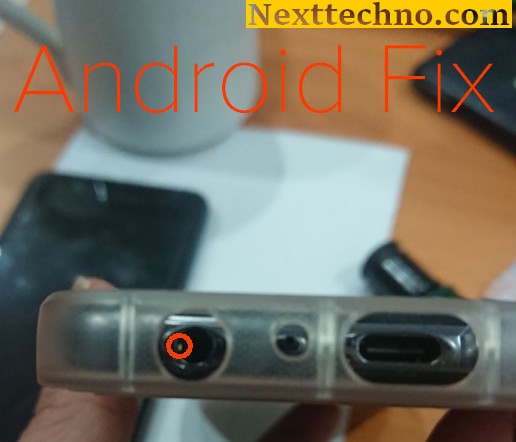
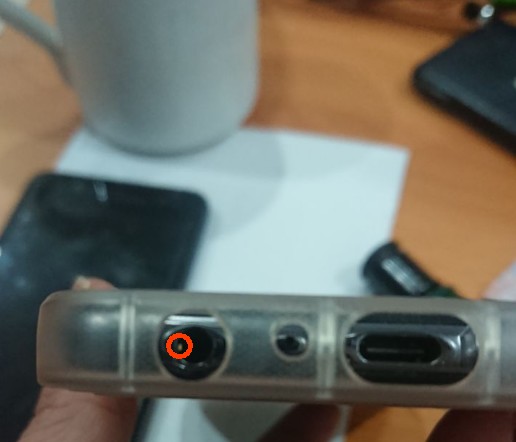
Do your Samsung/ Android device having several issues with External microphone from your headset/ external device? and your phone still with Jack audio? does not record a single sound on your phone.

you can listen to any sounds using your earphones/headphone but during Call the person/ calling can’t hear your own voice, tried basic call, Googlemeet & in voice recorder, still no mic sound.

and you think the headphone jack on your phone has no “input for mic”. Only has output for listening to sounds..

and you already done some basic reset such as

– Tested several headsets
– Rebooted several times
– Booted into safe mode, and mic still didn’t work.

Got Solution for you.

Just bent out the microphone pin with a small screwdriver / Pin and now it works great again.

Explanation of generative artificial intelligence and its applications in various industries.

The generated AI is an artificial intelligence that can create new content and ideas, including dialogue, stories, pictures, videos, and music. Like all AI, the ML model -driven large models use AI. These models can be used on a large amount of data, which is usually called the basic model (FMS). The latest progress of ML (especially the invention of the neuron network structure based on a transformer) has led to the rise of a model containing billions of parameters or variables. In order to understand the changes in scaling, the biggest model proposed in 2019 is 330 m parameters. Now, the largest model exceeds 500B parameters -only increased by 1,600 times in just a few years. Today’s FMS, such as LLM (Large Language Model) GPT3.5 or Bloom, and text made of stability-AI, the stable diffusion of image models can perform extensive tasks including multiple domains, such Generate pictures, mathematical questions, dialogue and answer questions according to the file. The size and nature of the FMS distinguish them from the conventional ML models that are usually performed at certain tasks, such as B. Text’s emotional analysis, image classification, and predictive trends

At a high level, the generated AI refers to a class of AI models and tools developed for creating new content (such as text, images, videos, music or code). The generated AI uses various technologies-including neuron network and deep learning -rgorithms-to identify mode and generate new results based on them. Organizations and personnel (including software developers and engineers) are increasingly looking for generating Ki tools to create content, code, pictures, etc.

NFC Functions on Smartphones

There are many NFC functions on smartphones and iPhones. Because Android phones are now equipped with NFC or Near Field Communication. At first, this feature was only available on middle- and upper-class Android phones. However, as the times have progressed, since 2021, you can get an Android cellphone equipped with NFC at a price of 2 million.

Variety of NFC Functions on Smartphones
Because there are so many NFC functions on cellphones, later this feature will become a standard feature for every new Android cellphone that will be released. So, what are these functions. Check out the following reviews.

Electronic Money Top Up
The first function is to top up and check electronic money balances. The reason is now, electronic money is a means of payment that is used for several purposes. So, when electronic money runs out, you can top up at any time without needing to go to the convenience store or ATM.

Payment Instrument
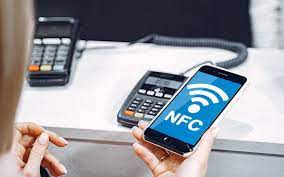
To use NFC as a means of payment you need to use an Android application that supports payments via NFC. When you are going to pay, you need to scan it by attaching it to the back of the cellphone to the NFC sensor that is in the cash register.

Sharing Videos and Photos
The NFC function on the next smartphone is to send videos and photos wirelessly. For a faster method, simply touch the back of the cell phone against the NFC logo on a device with NFC. The FC feature can make it easier for you to move large videos and photos in a short time.

Scan Information from Smart Poster
Smart Poster is a type of creative media that is widely used by several brands. This media already has an NFC chip in it, so it can display promotional content dynamically. When you attach your smartphone to the NFC chip on the poster, you will be able to see special promo content or web pages from a brand.

Wifi access
The NFC on Android phones can also be used for various WiFi connections. Later WiFi owners can share internet connection with other devices using NFC. The trick is to get closer to the back of the body and scan the NFC chip.

Speaker Connection
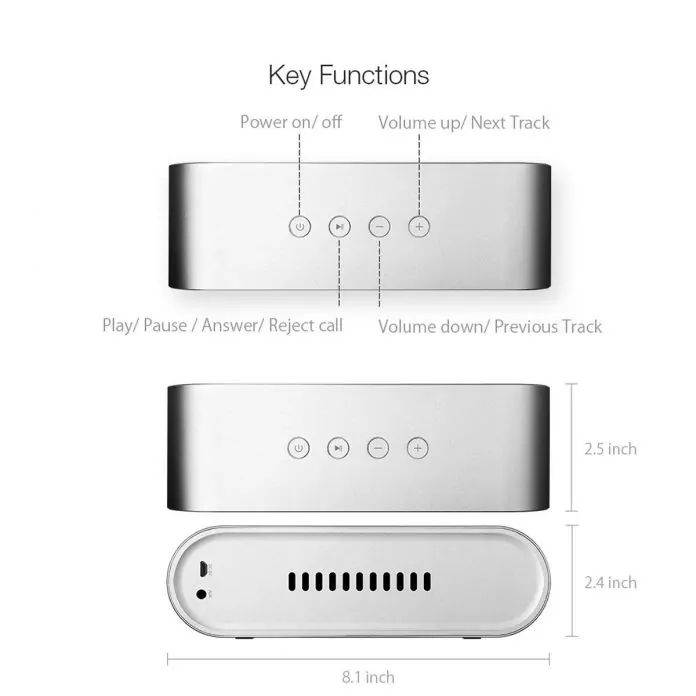
Now, mobile speakers are no longer wired. Most of the speakers connected to the HP via Bluetooth. However, there will usually be a lot of problems when connected. Because portable speakers are equipped with NFC. So that it functions to connect the cell phone to the speaker by placing the cell phone on top of the speaker.

Sharing Contacts
Furthermore, the NFC feature also makes it easier for you to share contacts or phone numbers with other devices. For that, you don’t need to write or mention the contact’s name. By using NFC, you can also fill in all the data in the contact.

Data Sharing
The first time Android Beam technology was introduced in Android 4.0. With this technology, devices can share data in proximity. When there are two Android cell phones with NFC close together. Later a notification will appear around the question whether to share content or not.

Access Card Emulation
The NFC function on smartphones then becomes access card emulation. The reason is that access cards can open doors as well as tickets so that users can use the elevator. So that the data on the access card can be transferred to the NFC feature.

check in.
Finally, the NFC function on a smartphone is check-in. Check-in is a basic function that needs to be done when NFC is embedded in a cell phone. The reason is that this check can be useful to notify that someone is at certain coordinates.

Best Virtual Reality Glasses For Smartphone

1.Samsung Gear VR

The first glasses that can be recommended are the Samsung Gear VR. These glasses are among the best glasses that are compatible with smartphones. These glasses are pretty good because they can provide a clear enough visual appearance that can be challenging when used to play games or just to watch movies.

2. Google’s Daydream view

Google Daydream View is one of the products released in 2016. This product is claimed to have a fairly light weight and is compatible with smartphones made by Google, namely the Google Pixel and Pixel XL.

3. HTC Vive

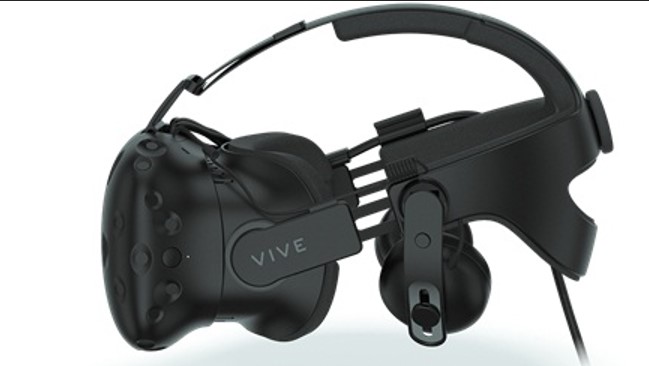
One of the best 3D VR glasses right now that you can choose from is the HTC Vive. These VR glasses are equipped with 70 sensors which of course will work very well when playing games that are supported by 360 degree technology. To keep users from getting dizzy quickly, these glasses are also equipped with a latency level of 90 Hz. HTC Vive VR glasses have the advantage of being able to recognize lighthouses so we don’t have to worry about moving around in the room.

4. Oculus Rift

One of the best virtual reality glasses that is very popular is the Oculus Rift. We can connect this product to a DVI computer and a USB port which can track the user’s head movements very well. These VR glasses also add 3D imagery on the stereo screen. The refresh rate technology on these glasses is almost the same as the HTC Vive, so the quality is pretty good.

5. Sony PlayStation VR

The next best virtual reality glasses that we recommend are the Sony Playstation VR. This product is still quite new like Google Daydream, which was released in 2016. These glasses use a 5 inch LCD screen made from the original prototype. Apart from that, with the latest technology, Sony also offers a 120Hz refresh rate to make Playstation games more real. The technology embedded in these glasses will make the wearer comfortable.

6. LG 360VR

The next best virtual reality glasses are products from LG, namely the LG 360 VR Headset. Not inferior to other brands, LG also launched virtual glasses that can be used for smartphones. The interesting thing that can be seen from this product is that you don’t need to put your glasses close to a damaged cellphone, namely the smartphone that you have will be connected to these glasses with USB-C.

7. Microsoft Hololens

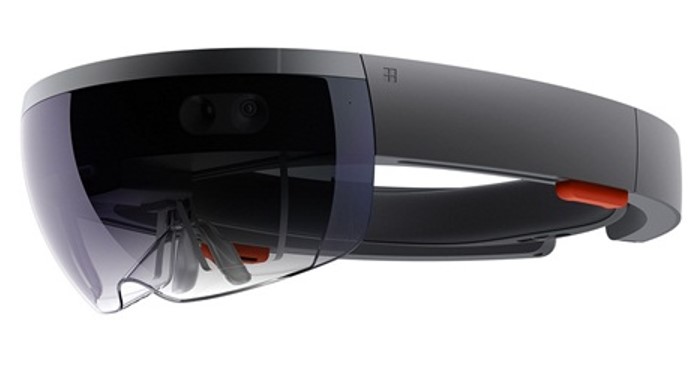
The other best VR glasses that you can choose are at Microsoft Hololens. The design of these glasses is quite different from other VR causes in that they incorporate a more modern virtual reality. This device also combines elements of the real world and virtual world very well.
8.Huawei VR

The best VR glasses for smartphones that can be recommended are Huawei VR headsets. These virtual reality glasses will work very well including with Daydream which is a platform from Google. If you already have a Huawei P10, this headset is perfect for you.
9. Sulon Q

Sulon Q is rumored to be one of the toughest competitors for the HTC Vive and Oculus Rift. One of the advantages of these best virtual reality glasses is that they can be used even if your PC specs are low. You can also use these VR glasses when using augmented reality applications or playing games. The price for Sulon Q itself has not been determined even though this vr headset has been released since 2016.
10. Google Cardboard V2

Google Cardboard is one of the cheapest VR glasses and has been released for a long time so that there are a lot of users. These glasses use a gyroscopic sensor which is expected in an accurate positioning system. Because of this, this product can track your head movements very accurately.

Guidelines to Buy Cheap Laptop – Refurbished or Used One

‘Refurbished’ laptops are indeed more affordable than new laptops, and with (some) good refurbishment it makes no difference or function from a new machine. However, there are significant differences between ‘used’, and refurbished laptops, so it can sometimes be difficult to tell the difference. In this article, we’ll talk about refurbished laptops and what to look for to help you find one that’s good, or even like new.

What Is a Refurbished Laptop?
Refurbished laptops are laptops that are used or that have been removed from the box, cleaned, repaired, and put up for resale. There are types of reconditioning that are carried out by the laptop manufacturer itself (or often called the ‘manufacturer’), and there are also those that are carried out by third parties (sellers). Refurbished laptops are usually sold at a significant price difference compared to new laptops of similar type/specs. The main question people often ask is “Is that refurbished laptop still good or worth using?” Here are a few ways to find a good, refurbished laptop.

Distinguish Between Used and Refurbished Laptops

Refurbished and used laptops are not the same, but most refurbished laptops have been used before, aka used. In some cases, certain parties may have taken the computer out of the box for a reason (eg for display or exhibition purposes), in which case the seller may sell it as refurbished but not new. Laptops that have been used and returned to stores are prime candidates for the refurbishment process.

Before being sold as refurbished laptops, laptops are usually inspected for cosmetic repairs, tested to ensure full operation, repaired (replacement of parts) if necessary, and cleaned. In some cases, internal components will be replaced or upgraded even if they are still in good working order. Usually a ‘factory-reset’ is also carried out, with the installation of a new/fresh operating system. This section is important if someone previously used the laptop because you don’t want to buy a refurbished laptop that still has a lot of data from the previous owner.

Where to Get/Buy a Reconditioned Laptop

When choosing a refurbished laptop, it’s important to consider the seller. If a laptop is factory refurbished, then the process is done by the same manufacturer that made the laptop. It’s likely a laptop that has been unboxed basically new and just tested to make sure it works, or it may have been sent back damaged, repaired, tested, cleaned, and available for sale at a discount. Manufacturers usually provide detailed information about their repair process and offer the best guarantees.

Some distributors/resellers also have repair or renewal programs, where the retailer renews the laptop or contracts with a third party to do so. For example, a third-party service provider may join a ‘refurbishment’ program to sell refurbished laptops and other electronics through a marketplace. Programs like this usually have strict requirements, so you can keep track of what’s going on during the repair process. Sellers who provide refurbished laptops usually have their own service center and carry out the process independently (which will also function as a service center if problems are encountered in the future).

Obtained Guarantee

The warranty period varies from seller to seller, and some laptops are not covered by a warranty at all. New laptops usually come with a one-year warranty, and that’s what you should look for in a refurbished model (when possible). Although refurbished laptops are technically not new, they are sold in a variety of conditions, from ‘like new’ to ‘battered’, so sellers must be willing to provide support and comfort to buyers, especially after purchase (after sales service). Some vendors provide warranties of up to several months (with certain conditions), and some as little as a few weeks or days (usually for checking and testing).

Conditions and Equipment
The condition of the laptop will depend on whether it has been used by someone else before (second hand), and if so, how the former owner behaved in using it. An adequate repair process will return a used laptop to like-new condition, but there may be some cosmetic issues such as scratches, peeling paint or dents that cannot be repaired. The refurbished laptop chosen should ideally be clean and free of physical defects, as this is the first indicator of past usage behaviour.

Refurbished laptops should also be cleaned internally (of dust/dirt etc.), tested, and repaired. Any components that are not working properly should be replaced, and those that are working properly should be cleaned. In the end, a refurbished laptop should look and function like it did when it was new. It may lag behind in components and performance compared to newer models, but it should work as well as it did when it was new.

Some sellers will give their laptops a grade or condition with words like ‘like new’, ‘BNOB’ (brand new out of box), ‘grade A’, or other terms. Pay attention to specific terminology, because each rating level has its own criteria that reflect the item you want to buy.

Model/Specifications and released year

The specifications and model (what year) you get will of course depend on the budget you have. However, in essence, buying a refurbished laptop as an alternative is a way to save money, by getting the best (laptop) performance for the money you have, compared to buying a new one.

If your needs revolve around running basic tasks like word processing (Office suite) and surfing the internet, you can safely look at refurbished laptops that are older or with lower specifications (ideally, no older than 5-6 years). However, to play the latest games, as much as possible look for reconditioned laptops released in the last 1-2 years, to be able to keep up with the needs of the latest games.

Apple laptops tend to last longer, but you can still experience performance issues after more than five or six years. The main problem is that recent versions of macOS usually only run-on Macs made within the last eight years. Buying a refurbished old MacBook will eventually lock you out of new operating system updates even if the laptop still works fine, or alternatively you can install another operating system to keep it running with security updates (such as Ubuntu or LinuxMint).

Closing

Buying a reconditioned laptop can save costs and provide excellent performance compared to new prices, so it is a good choice for many people, such as students, parents (who want to look for home or school children’s needs), gamers with a mediocre budget, to ‘hunter hunters’.

When you buy a reconditioned laptop, there are several things that must be done immediately to maximize its use, such as:

– Check all functions and completeness, whether they are in accordance with the conditions when they were new, or according to the seller’s description

– Ensuring a fresh operating system, no data (or possible viruses) left behind from the old owner

– Install applications/software according to your needs, and transfer data for use

– Upgrading possible components (such as RAM, or additional storage drives), if there is still some budget left.

Regarding the selection of sellers, try to buy them at authorized stores or official stores that provide direct manufacturer reconditioned goods, or if you buy online from a marketplace, make sure the seller has a good sales history (reputation), provides a fairly fair guarantee, and has a service center in the event of Complain even when you don’t want it.


Android Verified Calls new features

In case you’re hoping to get much more protection on your Android telephone, you should empower Google’s Verified Call highlight right away.

Confirmed Calls is Google’s method of intensifying guest ID so that you can rapidly tell if a guest is an authentic business or not. With this element now accessible, organizations can join to utilize Verified Calls which causes it workable for them to better to educate you why they are calling. At the end of the day, you won’t need to answer the call to know why that genuine business is attempting to get in touch with you.

For clients, it’ll help make it simpler to dodge spam calls and make it conceivable to promptly confirm if a call is from an organization they trust. For organizations, this new element can expand call answer rates and could assist work with trusting among you and potential customers/purchasers.

Requirement

The element began turning out to Android in September and is just accessible for the Google Phone application. In the event that your gadget works with stock Android you ought to be a great idea to go. Notwithstanding, if your Android telephone of decision is a Samsung (or from another maker that utilizes an alternate telephone application), you’ll have to introduce the Google Phone application from the Google Play Store. Without the Google Phone application, you can’t utilize this component – one that many will inevitably be viewed as an unquestionable requirement have.

Instructions to empower the Verified Calls highlight

To empower the Verified Calls highlight, open the Phone application and tap on the menu button in the upper-right corner. From the popup menu, tap Settings. From the rundown of choices, tap Spam And Call Screen

The Spam And Call Screens alternative in the Google Phone Settings page.

Empowering the Verified Calls highlight.

What’s more, that is everything to empowering the Verified Calls highlight. You probably won’t notice a very remarkable change from the start on the grounds that few out of every odd business has joined up with the Google Service. Be that as it may, as protection keeps on being increasingly more critical to shoppers, administrations and highlights like Verified Calls will turn into the true norm for organizations and customers.

Inevitably you should begin seeing more data on your approaching call screen to show that it’s a confirmed business calling, however why that business is attempting to get in touch with you. In case you’re a business, hoping to take on Verified Calls, look at the official Google site for more data.

NetSpot PRO on Mac Review

Wireless networking has become the primary, and often only, connection method for many users. Here’s how to troubleshoot corresponding performance issues.

NetSpot PRO model 2.12 is a small-footprint app. The application occupies only 26MB of disk area and usually consumes much less than 8% of a CPU on my Mac when performing a survey and much less than 4% when solely discovering and amassing metrics on handy wi-fi networks. Unlike different functions and community utilities I’ve used, NetSpot PRO locates and identifies greater wi-fi connections, as well.

The new model and updates consist of guide for 802.11 ax, additionally recognised as Wi-Fi 6, consists of help for macOS Catalina and replaces the older NetSpot Wi-Fi Reporter with a new Wi-Fi scanning technology. The new version additionally consists of consumer interface improvements, energetic scanning well matched with HTTPS and subtle reports, in addition to optimized reminiscence overall performance and Retina Ready compatibility.

Just open the utility to find out wi-fi networks. The application starts performing community evaluation on startup. In addition to shooting carrier set identifiers (SSIDs), or the wi-fi networks’ names, NetSpot PRO collects corresponding Wi-Fi tools hardware addresses, or primary carrier set identifiers (BSSIDs), the wi-fi networks’ channels, and the radio bands in operation. The software additionally detects and archives the protection technological know-how in play, such as WPA2 Personal or WEP, as properly as the suspected Wi-Fi tools vendor.

That statistics alone, as proven in Figure A, is pretty beneficial for troubleshooting complex wi-fi community issues. For example, the SSID subject confirms the identify of the wi-fi networks in operation. As a advisor who’s spent years in the field, I’ve located the true community title might also no longer in shape a client’s or quit user’s recollection, so such hard-and-fast information is helpful. The identical good judgment holds proper for the safety mechanism (WPA2 vs. WPA vs. WEP, for example) in place. The channel records assists professional eyes in rapidly recognizing conversation conflicts that can manifest when two separate networks—including a earlier unknown community on the different facet of a shared wall in a public workplace building—compete for site visitors the usage of the identical channel. When such blunders are encountered, altering the wi-fi channel you administer can take away the problem.

The app’s discovery process, however, additionally captures extra records that proves indispensable for performing extra superior wi-fi community troubleshooting. In addition to shooting Wi-Fi mode (such as ac, a, n and a/n), the software collects signal-to-noise ratio stages and corresponding sign energy metrics for every get admission to factor detected. NetSpot PRO users can double-click sign levels, too, for greater facts on every AP’s unique performance. Using these metrics, you can hint malfunctioning get admission to points, decide whether or not an extra get admission to factor is wished to accommodate people in a precise location, and affirm whether or not constructing materials, walls, and different digital tools may additionally be introducing conflicts and, if so, which AP is impacted.

Using the program’s Survey feature, you can diagram and mannequin future networks or even practicable AP additions to an present network. Using a transportable router, or shifting an current AP from factor to factor whilst trying out allows amassing wi-fi sign facts for the duration of an workplace or facility.

To operate a survey, click on the Discover/Survey button to location NetSpot PRO in Survey mode. Provide area facts with the aid of loading a sector file or drawing the corresponding boundaries. Alternatively, you can use a pattern map or use a clean template. Following the prompts creates a map that captures wi-fi sign records as you go your Mac during the facility whilst performing the test.

NetSpot presents onscreen directions that simplify and information customers via the technique when performing a subject survey. The firm’s user information and on-line survey aid documentation provide a exceptional help and describe on hand alternatives for performing and customizing tests, merging a couple of image archives and making feel of the ensuing sign power information. Regardless, I discover the survey’s ensuing color-coordinated maps, as proven in Figure B, usually inform me at a look the place wi-fi indicators are going to come across bother and gain from extra strength.

The application presents different benefits, too. Using the Discover feature, you can stumble on unauthorized wi-fi get right of entry to points, pick out naming and configuration errors, and affirm how a ways past a perimeter wall your organization’s wi-fi sign is leaking.

Strategy to Pick Up Great Sound Quality Speaker

No matter if you really make music for a personal passion or if you happen to be regularly seeking a contract, you’ll need high-quality devices to save your distinct voice. As you work so faithful record the best songs, it usually is irritating once you play back the track and hear pops the location where the p’s and b’s should be. Any popping is caused by the pace which the sounds produced by the characters travels and it can take place even though you may utilize a costly microphone. Luckily, there’s a simple solution that all professional studios be aware. A pop filter can eliminate the problem and create a recording crisp and precise sufficiently to deliver it to record labels or play it with your family and friends. You will discover some great pop filters over on Amazon that can be extremely affordable for just about any under-rated performer or a musician who doesn’t have a substantial deal. Since the bothersome popping will be lacking from your recordings, you are going to no doubt become happier in your voice. You are going to additionally save time with each and every song simply because you will not need to do them repeatedly in order to avoid all the sounds as a result of air flow hitting your mic. Pop guards are really light and easily distribute noise after you make your b and p noises during your track. There is an efficient and also inexpensive

A lot of these filters work effectively for any kind of music and often will go with the majority of mics. If you save audio for other people, they will likely truly value the reality that they don’t need to reproduce their tracks several times just because of the popping.

When you purchase this specific pop shield, you will additionally receive a publication full of tips and hints for making your actual recordings as clean as you can.

The cleaner your voice, the good deal more valuable it’ll be. When you find yourself prepared to increase the standard of your own taped audio, just go to Amazon.com and consider the actual pop masks available for artists just like you. You can expect to cut back on precious time and be more thrilled by the particular way you sound on recording once you include a pop filter to your recording devices.

Faster Way to Fix Office 365 Failed activation Failed For Geographic regions Reason

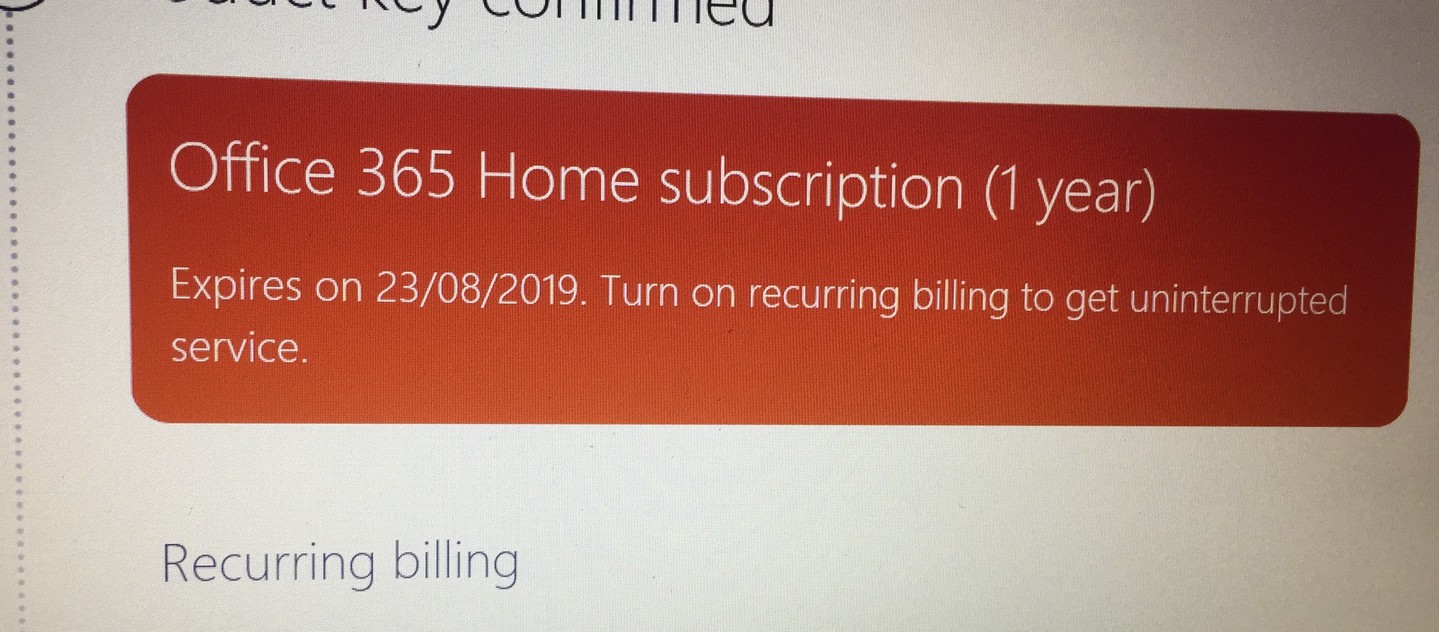
Buy new laptop with Office 365 home key for 5 user in Australia and without hesitate I brought that laptop to another country without knowing office 365 need to be activated in certain region where I bought it, and without any doubt that the key original one, I just activated in Asian Country and it give me an error, and result I CANNOT ACTIVATED MY OFFICE 365!!

with reason as follow :

sorry, we can’t use this product key because your current subscription was set up in another country/region. Just Hang on to your product key until then our contact support to resolve this immediately

really annoying, try to reinstall it and even contact customer service with machine answering my question and in the end i assume i should bring my laptop back to Australia and activated there, since they detected my IP address during activation.


So, You only need to “make” your computer in Australia, so try to install free VPN, why VPN ? because it change a whole computer IP address, by passing your recent IP address as US or like me Australia


So i Download free vpn https://windscribe.com/download with 1 month free trial and only 2 Giga Limitation for download ( who cares, you only need it to activated trough your software )


after that! Im able to activated my Office 365, very noob way to activated your ORIGINAL key!!!

Hope in the future Microsoft not giving any difficulties for people who already bought it for real and get hassle during their activation process


Generate Bitcoins from Your Home Computer

Because it requires huge of power and electrical resources, the process of mining (mining) cryptocurrency is usually run with a special computer.

Now with your own desktop fitted with many graphics cards to server farm. But lately emerged an alternative form of software that allows users with a laptop or a regular computer to participate in mining without needing to spend to buy expensive devices. The Honeyminer startup software runs dynamic mining by combining the user’s computer into a pool of thousands of other computers. Each computer contributes power to the cryptocurrency mining process.

The “power” donated comes from the computer GPU. If it is not in use, then the computer GPU will be used to participate in processing the mining process together with GPU kompter-other computers incorporated in the pool Honeyminer. Thus, while the GPU capability of a computer may be small, the combined power of thousands of GPUs can generate significant resources for this collective mining process. As summarized KompasTekno from The Next Web, Saturday (28/07/2018), the user was simply running Honeyminer application on the computer which happens to be idle graphics processor to start contributing power.

Honeyminer software will handle all configurations automatically, including switching to another cryptocurrency miner every 10 minutes, or in accordance with price movements so that the use of computer power in the pool can always lead to maximum profit. “Users also do not have to calculate themselves or, set the configuration, or monitor prices manually,” said advisor Honeyminer, Noah Jessop. Also read: Samsung Bikin Chip Chip Bitcoin Honeyminer supports mining of popular cryptocurrencies, including bitcoin, ethereum, ethereum classic, zcash, monero, and others that do not require a specific computer (ASIC). Available for free, Honeyminer software opens the door for most people to participate in chasing cryptocurrency. But presumably users can not expect too much about the benefits that can be generated. The profit generated by the Honeyminer pool is distributed to the owners of each computer in different amounts, depending on the quality of computer hardware used to donate power. In this case, a large computer with some graphics cards even average can only generate profits of one or two US dollars by running a Honeyminer all day.

4 Easy Ways to Take Care your smartphone camera


The smartphone camera is important, but its presence is often overlooked. Generally people are more concerned with the physical appearance of smartphones, they better protect the body of the smartphone with a case of coating the screen with anti-scratch and maintain the innards of the smartphone by keeping the memory to stay within safe limits so as not to easily slowing down / lagging

Though people consider that the camera on the smartphone is an important component. Smartphone cameras even become one of the important considerations before buying a smartphone. People are willing to buy A smartphone rather than smartphone B because of its better resolution and better quality results. This is because today people prefer photography, either because of the hobby or the affairs of existence for selfie.

The dominance of smartphones with a good camera now even beat pocket cameras. Smartphones are selected because they are more practical and useful, as they can be edited and uploaded directly to social media. However, unfortunately the smartphone camera is rarely treated, Not because it forgot, probably because do not know how to care for the camera on the smartphone.

Here’s how to clean and maintain a smartphone camera easily:

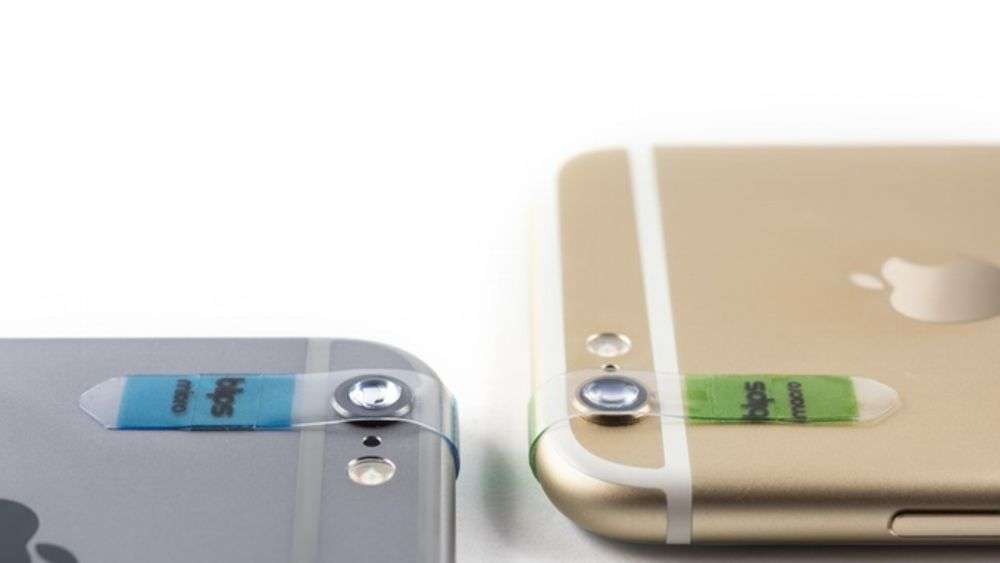
– To clean the smartphone screen, do not use tissue or cotton. You can use a cleaning cloth with a soft material and high absorbency. Do it regularly.
– Avoid excessive sunlight because it can damage the sensitive part of the lens of the smartphone.
– Do not get scratched on lenses, because it can make the image or video less than perfect.
– Keep your smartphone away from objects that contain magnets, such as computers or televisions.

Those are some tips for caring for a smartphone camera that you can apply, really easy right?

Extras Security Systems for Windows 10

Extras Security Systems  for Windows 10Windows has been the target of much criticism over the years because it is considered as a platform that is constantly the target of malware, hacks, viruses, and so on. But in a new advertising, campaigning Windows if Windows 10 will be the most secure operating system than other platforms.

Quoting from Ubergizmo, Saturday (07/25/2015), the ad highlights some of the security features of the platform, such as the way Windows 10 supports a variety of sensor systems with biometric login.

Biometric sensors that will be found in Windows 10 will support iris scanning, facial recognition and fingerprint scanning. Microsoft also showed off Windows 10 other advantages, such as being able to detect websites that could potentially steal personal data of users.

Windows 10 uses a cloud-based system to prevent attacks and data theft from malicious websites. In addition, there are also features of the old Windows Defender to help protect your computer from malware attacks.

Although Microsoft provides a variety of features that support the security, Windows 10 users will still advised not arbitrary explore the website, do not open e-mail attachments suspicious, and avoid sites that require you to download and install the file.